


Suite Pillar: 11 Modules and 79 Settings Built for Unreal Engine 5
The TXCIZ ARK: Survival Ascended suite arranges 79 controls across 11 modular panels on Windows 10/11 64-bit under BattlEye, preventing thousands of Nanite jungle entities and tribe pillars from tanking FPS across Official and Unofficial Steam or Xbox App clusters.
By splitting 04. Player ESP, 05. Dino ESP, 06. Structure ESP, and 07. Resource & World ESP into separate distance-capped pipelines, you can scout breeding tames or inspect enemy bases with zero overlapping screen spam.
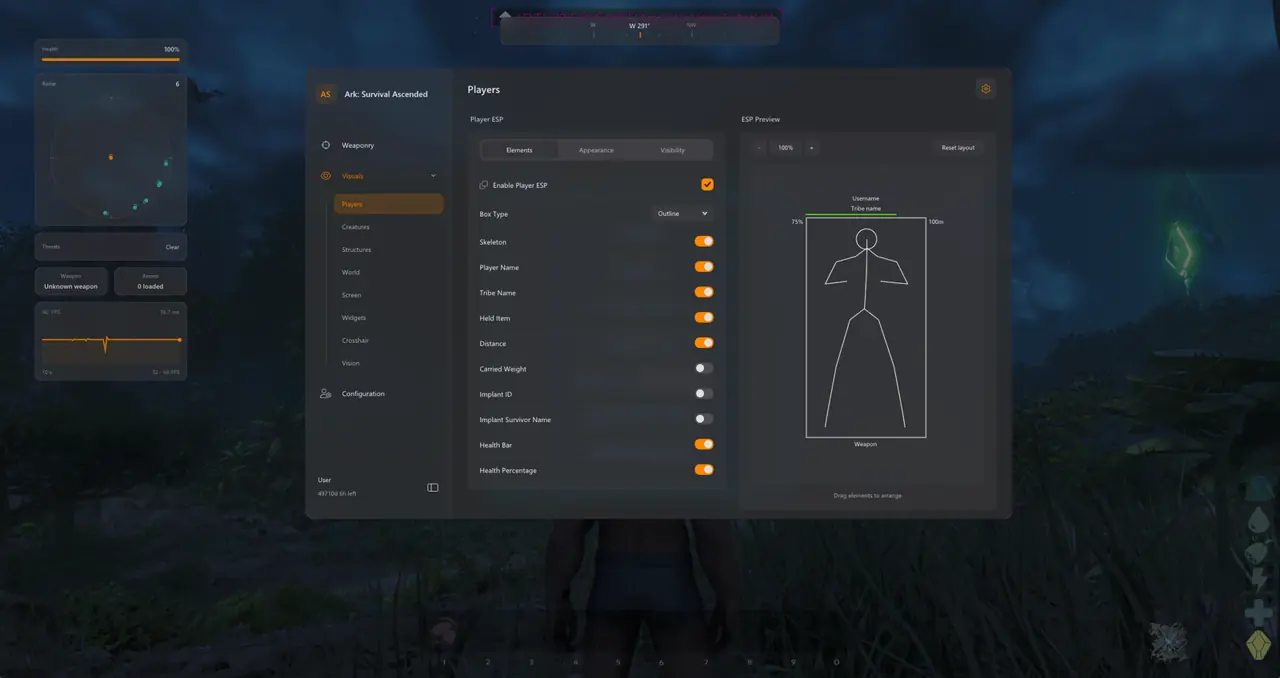
Dino ESP: Wild Level Scouting, Alpha Hunting, and Tamed Telemetry
Dino ESP filters wild creatures by level, species priority, health, torpor, and Alpha or Hidden status so flyer scouts locate 140–150 tames and spot ambushes immediately.
| Dino ESP Filter Group | Displayed Creature Telemetry | Taming & Raiding Application | Recommended Range |
|---|---|---|---|
| Wild Level Scouting | Species name, wild level (1–150+), health, torpor state | Isolates max-level breeding tames without manual spyglass checks | 250 meters |
| Alpha Variant Hunting | Alpha Rex / Carno / Raptor tags, glowing skeleton, HP | Locates high-XP Alpha kills and trophy tributes across redwoods | 400 meters |
| Tamed Enemy Dinosaurs | Tribe name, creature name, rider indicator, health % | Assesses enemy mounted threats and passive tames | 300 meters |
| Friendly Tribe Tames | Tribe tag, current health, carried weight % | Monitors base defenders and metal-hauling packs | 150 meters |
| Hidden / Burrowed Dinos | Purlovia / Basilisk underground position markers | Prevents lethal dismount stuns while traveling on foot | 80 meters |
Configure your creature distance caps below and check our Wild Dino Level 150 & Alpha Taming Guide for breeding routes.
Structure & Resource ESP: Turrets, Vaults, and Mineral Nodes
Separating 06. Structure ESP (turrets, generators, vaults, beds, C4) from 07. Resource & World ESP (metal, crystal, black pearls, element veins, supply drops) keeps raid reconnaissance clean.
Key Structure and Resource Filter Groups
- Turret & Power Isolation: Outlines Heavy, Auto, and Tek Turrets plus gasoline or Tek generators through cliff faces.
- Storage & Trap ESP: Flags Vaults, Cryofridges, Dedicated Storage, placed C4, and underwater water mines.
- Three Resource Groups: Toggles Minerals (metal, obsidian, pearls), Organics (sap, flowers), and Landmarks (element veins, drops, notes).
Use Friendly and Other-Structure filters alongside Select All / Clear All mineral toggles to avoid foundation spam. For deep turret range scouting and sniper ballistics, inspect our Turret, C4 & Tribe Structure ESP Guide and Projectile Aimbot & Ballistic Lead Guide.
Building Specialized Profiles: Field Taming vs. FOB Raiding
Saving distinct 11. Saved Profiles configurations lets you swap from wild creature scouting to cave raid reconnaissance in two clicks:
- Open the TXCIZ menu with Insert and select 06. Structure ESP.
- Enable Heavy Turrets, Tek Turrets, and Generators at 200 meters with red outlines.
- Clear 07. Resource & World ESP so mineral labels do not obscure defender sightlines.
- Disable Wild Creatures in 05. Dino ESP and enable Enemy Tames at 300 meters.
- Turn on 09. Radar & HUD 2D Radar plus Off-Screen Arrows for enemy players and flyers.
- Save under 11. Saved Profiles as FOB_Raid_Offensive alongside a separate Field_Taming slot.
Verify live Undetected status on Live Cheat Status, review Windows 10 & 11 Setup Guide, and choose 1-Day (€5.99), 1-Week (€24.99), or 1-Month (€59.99) access on the ARK: Survival Ascended Product Page.
Prerequisites, Expected Outcome & Fast Triage
Launch Txcizware-Loader.exe (2.61 MB) on Windows 10/11 64-bit only after completing Step 2 security checks.
System Prerequisites and Expected Launch Outcome
- OS & Memory: 64-bit Windows 10 or Windows 11 (24H2–26H2), Intel or AMD CPU, and 16 GB+ to 32 GB RAM.
- Display Mode: Steam or Xbox App in Windowed or Borderless at 100% DPI with HDR off and overlays closed.
- Expected Outcome: Loader prints [+] You can open the game now, F2 beeps at Main Menu, and Insert opens the StreamProof menu.
Fast Troubleshooting Triage
- 0x00000001 / Auto-Close: Redo Step 2 Security toggles (Defender resets on reboot), sync clock, enable WARP, and Run as Admin.
- Stuck 10% / 521 / 429: Enable Cloudflare WARP (1.1.1.1) or wait 15–30 minutes for HTTP 429 cooldown.
- Overlay Offset: Verify Borderless Windowed, 100% scale, and quit Discord, NVIDIA, or RTSS overlays.
- BSOD / MsSo64.sys: Update drivers, switch HVCI and Secure Boot OFF (pause BitLocker first), and send Minidump plus injector.tos to #🎫┃ticket-maker.

