
How 40+ Actor Classification Solves Dead by Daylight Chase Clutter
TXCIZ Dead by Daylight categorizes over 40 Unreal Engine actor classes into 5 filtered overlay channels across Windows 10 and Windows 11 64-bit (8 GB+ RAM), isolating active 28m jungle-gym Pallets, Vault Windows, and Killer Traps from distant props under Easy Anti-Cheat.
High-wall loops like the Killer Shack and L-T tiles block standard line-of-sight reads, turning blind corners into free hits. Drawing generic boxes over every locker and distant chest hides active chase paths, whereas TXCIZ actor filtering displays only relevant threats.
Five Functional Actor Groups: Players, NPCs, Loops, and Traps
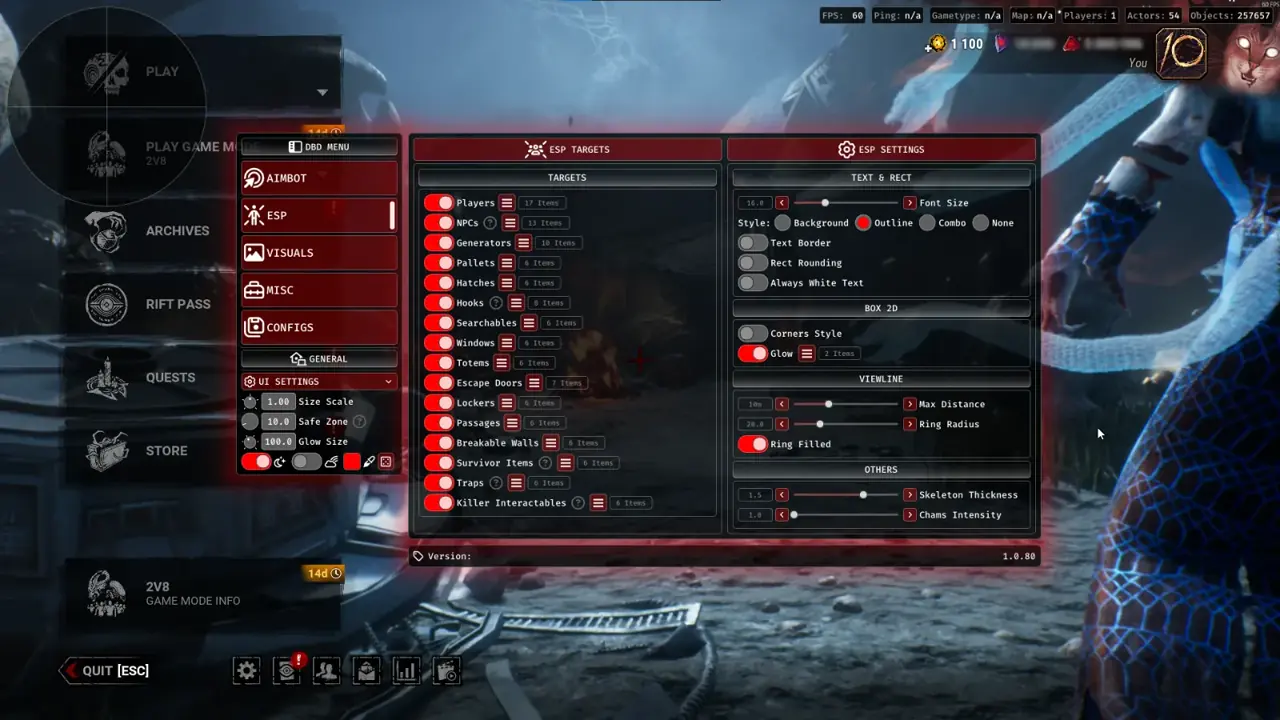
Module 03 ESP and Chams separates trial entities into Players, Killer-Spawned NPCs, Core Objectives, Loop Geometry, and Killer Traps with independent color pickers and distance limits.
Assigning tight distance bounds per group lets you read Killer movement across the realm while displaying nearby pallet states only when looping.
| Actor Group | Tracked In-Trial Entities | Telemetry & Style | Chase Radius Cap |
|---|---|---|---|
| Players & Killer NPCs | Survivors, Killers, Nemesis Zombies, Knight Guards, Victor | 2D/Corner boxes, skeletons, health state, distance | 96m (Full Realm Read) |
| Loop Geometry | Pallets (Upright/Dropped/Broken), Vault Windows | State-colored boxes and unbroken tile outlines | 28m (Active Loop Only) |
| Killer Traps & Power Props | Bear Traps, Hag Phantoms, Freddy Snares, Sadako TVs, Biopods | Set/disarmed alerts, hazard colors, distance | 48m (Pathing Safety) |
| Core Macro Objectives | Generators, Totems, Exit Gates, Hatch, Chests | Repair %, perk tags, gate switches | 64m–200m (Macro Routing) |
Chase Tile Geometry: Upright Pallets, Vault Windows & Killer Mindgames
Knowing whether a loop pallet remains upright, dropped, or shattered before turning a blind corner prevents running into dead zones.
TXCIZ Tile Geometry marks upright versus dropped pallets and window vaults in contrasting hues so you chain connected loops effortlessly while monitoring Killer Red Stain direction.
Neutralizing Trapper, Hag, Knight, and Singularity Setup
Dedicated Trap and Killer Interactable filters highlight concealed Bear Traps in tall grass, Hag teleport traps near hooks, Freddy dream snares at vaults, Knight Patrol Guards, and Singularity Biopods before you commit to a rescue.
Distance Scaling and Anti-Clutter Routine for Competitive Loops
Follow this six-step profile sequence to build a clean chase-loop preset that maximizes frame rates (60+ FPS) and keeps active tile reads crisp.
- Open the TXCIZ overlay with
Insert, select ESP and Chams, and enable Players with Skeletons and Health States. - Set Player Render Distance to
96mso you read cross-map Killer rotations and teammate chases early. - Configure Pallets and Vault Windows with a tight
28mcap so only your immediate loop displays outlines. - Enable Traps and Killer Interactables at
48m, assigning bright red for Bear Traps and violet for Hag Phantoms. - Restrict Generators to
64mduring active chase presets or hand full-map macro tracking to a secondary Config slot. - Save the profile under Configs as
Survivor_Chase_28mto protect your distance thresholds across patches.
For full-map Generator %, Hex versus Boon totems, and Hatch routing, read our Generator, Hex Totem & Hatch ESP Guide or check the 6-Module Dead by Daylight Setup Guide.
Inspect live status on Live Cheat Status, confirm Windows prep on Windows 10 & 11 Setup Guide, and compare plans on Dead by Daylight PC Cheats.
Prerequisites, Expected Outcome & Fast Triage
Verify your Windows setup and loader status before launching Dead by Daylight on Steam, Epic Games Store, or Xbox PC.
- Prerequisites: Windows 10/11 64-bit (
24H2-26H2), 8 GB+ RAM, Windowed or Borderless (100%DPI, HDR OFF), Step 2 toggles OFF,/statusbadge Undetected. - Expected Outcome: Library Launch displays [+] You can open the game now;
F2at Main Menu triggers a beep for theInsertoverlay; OBS Game Capture hides every ESP box.
Fast Triage for Common Loader and Overlay Issues
Apply these four recovery steps if injection stops, network routes fail, or labels drift.
- Closes or 0x00000001: Redo Step 2 Defender switches after reboot, click Windows Time Sync now, and turn on
WARP(1.1.1.1). - Stuck 10% or 521 / 429: Enable Cloudflare
WARP(1.1.1.1) or wait15-30minutes for429limits to clear. - Labels misaligned or missing: Use Borderless/Windowed at
100%scale and exit NVIDIA, Discord, or RTSS overlays. - BSOD or MsSo64.sys: Update drivers, keep HVCI and Hyper-V off (pause BitLocker first), and send
Minidumpplusinjector.tosin #🎫┃ticket-maker.

