
Solving Bodycam's UE5 Fisheye, Darkness, and Uncoupled Sway
The TXCIZ Bodycam Suite organizes 90 controls into 10 modular tabs on Windows 10/11 64-bit under Steam Integrity Validation, directly countering Reissad Studio's Unreal Engine 5 fisheye camera distortion, heavy film grain, pitch-black CQB interiors, and detached weapon barrel sway across competitive Steam lobbies.
Unlike traditional shooters where bullets exit dead-center screen, Bodycam decouples character arms and gun muzzles from camera center while stripping out any built-in crosshair. Layering glowing Chams, static 2D crosshairs, and trajectory tools eliminates hesitation in pitch-black CQB corridors.
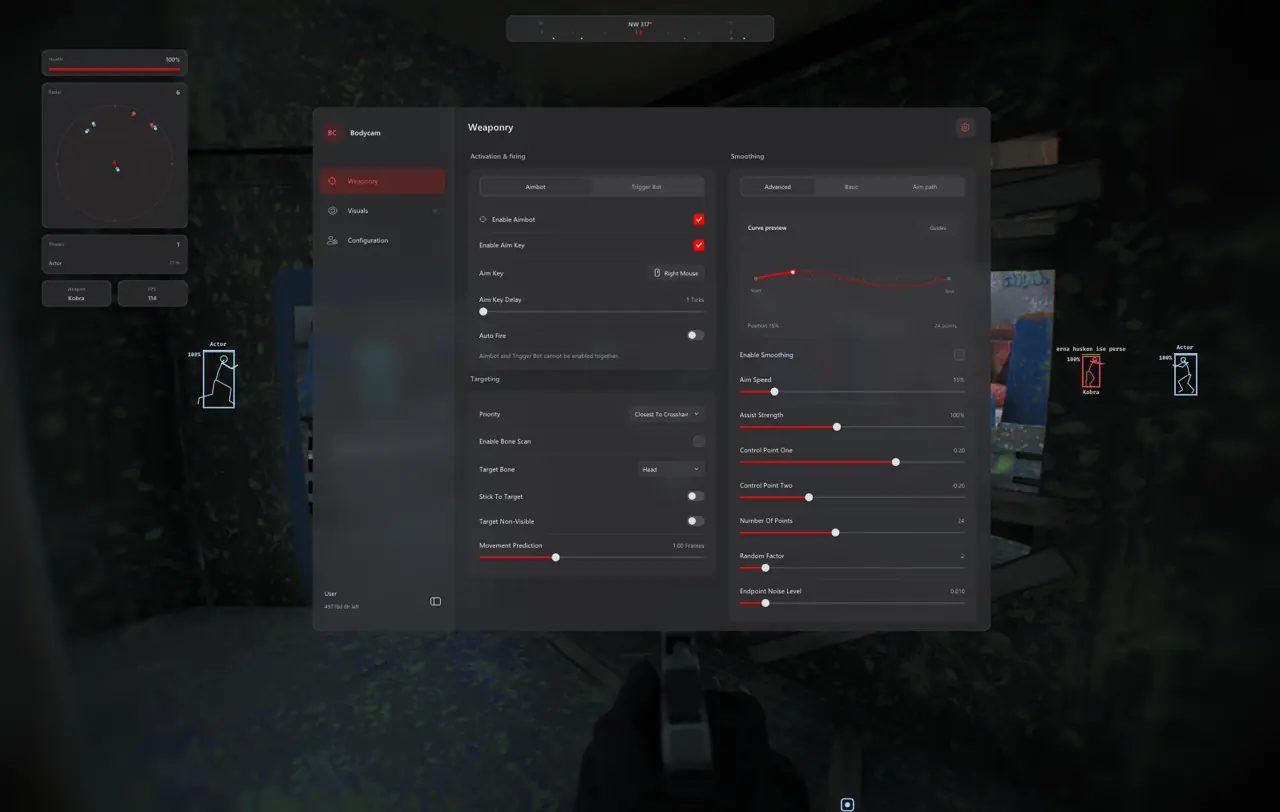
Architecture of All 10 Bodycam Feature Tabs
Every tab in the Insert menu toggles independently inside 10. Configuration & Interface, letting players combine subtle visual clarity with optional combat modules.
| Feature Group | Count | Included Controls | Primary Role |
|---|---|---|---|
| 01. Aimbot and Magic Bullet | 10 | Aim Key, 1–50 Tick Delay, Auto Fire, Magic Bullet, 5 Priorities, 22 Bones, 0–3 Frame Prediction | Target lock and trajectory redirection |
| 02. Trigger Bot | 6 | Separate mode, optional key, 0–50 ms reaction delay, Bone Scan, 0.25–2x radius multiplier | Passive auto-fire across doorways |
| 03. Aim Smoothing | 9 | Smooth/Balanced/Aggressive, Advanced Bezier, Aim Path Visualizer, Random Noise | Natural curved cursor movement |
| 04. Player ESP and Chams | 12 | Names, Health %, Skeletons, 2D/3D Boxes, Chams with Glow Slider, 300 m range, Drag Preview | Wall awareness and visible glow contrast |
| 05. Weapon and Drone ESP | 8 | Independent Weapon/Drone toggles, 2D/3D outline and filled boxes, separate distance caps | Recon drone and dropped gun intel |
| 06. Screen Visuals | 10 | FOV Circle, Dynamic ADS Multiplier, Snaplines, Directional Compass, Off-Screen Markers | Peripheral threat tracking |
| 07. Radar and HUD Widgets | 11 | 2D Radar, Compass Bar, Threat Warning, FPS and Weapon Widgets, Movable Panels (20–100% opacity) | 360-degree radar and customizable HUD |
| 08. Graphics and Lighting | 8 | Strip Film Grain, Chromatic Aberration, Motion Blur, DoF, Fullbright, Sun Color | Clear UE5 visuals and night lighting |
| 09. Custom Crosshair | 6 | 10 Presets, Gap/Length/Thickness, Rotation, Live Preview, RGB Color | Static screen-center reference point |
| 10. Configuration and Interface | 10 | Native Controller Support, Config Browser, Menu Shortcut, 75–200% DPI Scale, HDR/SDR controls | Gamepad input and saved profile swaps |
Glowing Player Chams vs. Magic Bullet Trajectory Redirection
Glowing Player Chams and Magic Bullet serve distinct tactical intents inside 04. Player ESP & Chams and 01. Aimbot & Magic Bullet, allowing discreet visual play or aggressive trajectory dominance.
Luminescent Player Chams and 40–60% Glow Calibration
Wireframe boxes often blur into cluttered scaffolding inside Russian Building and Abandoned Hospital. Coating player geometry in dual-color shaders lets you read exact limb silhouettes up to 300 meters.
- Visible vs Occluded Palettes: Assign bright green for direct line-of-sight targets and cool slate or violet behind solid concrete.
- Glow Intensity (40%–60%): Highlights dark silhouettes cleanly without blinding bloom inside flashlight-heavy rooms.
- Independent Drone ESP: Separates airborne recon drones from ground weapons so scouts never hide in cluttered debris.
How Magic Bullet Overrides Sprinting Sway and Spread
When enabled in 01. Aimbot & Magic Bullet, Magic Bullet redirects projectile hit registration in memory directly onto your selected target bone (across 22 skeletal choices). Combined with Lowest Health or Crosshair priority, shots register cleanly during full sprints without manual barrel stabilization.
Five-Step Bodycam Launch Workflow and Prerequisites
All Bodycam licenses (€3.99 1-Day, €12.99 1-Week, €23.99 1-Month) deliver instantly via Stripe to /confirmation with zero Cheats4You website login required.
- Verify active
Undetectedstatus on Live Cheat Status and complete Windows Step 2 prep on our Windows Setup Guide. - Download
Txcizware-Loader.exe(2.61 MB) from #📖┃guide in TXCIZ Discord into a standard Desktop folder. - Launch
Txcizware-Loader.exeas Administrator, sign into 1 loader account, redeem your License Key, and launch Bodycam. - Open Bodycam on Steam in Windowed or Borderless mode (16 GB+ RAM recommended) and press
F2once at the Main Menu. - Press
Insertin-game to enable Player Chams, toggle optional Magic Bullet or Custom Crosshair, and save inside 10. Configuration & Interface.
Prerequisites, Expected Outcome and Fast Triage
Requires 64-bit Windows 10/11 (24H2–26H2), 16 GB+ RAM, Steam client, and Borderless 100% scaling. Expect clean injection beep on F2, StreamProof OBS Game Capture output, and instant controller + KBM input recognition. If crashes (0xC0000005) appear, install VC++ Runtimes and DirectX, close overlays (Discord/NVIDIA/RTSS), and rerun Step 2.
Optimize frame rates and night lighting next in our Bodycam UE5 Clarity and Fullbright Guide or master CQB modes in our Bodycam Drone ESP and Body Bomb Guide, and inspect instant duration plans on the Bodycam Product Page.
Verify build uptime on Live Cheat Status and follow every Windows step in the Windows Setup Guide before opening Bodycam.

