
Street Shootout Geometry: Why Linear Aimbots Fail in Hood Warfare 2
The TXCIZ Hood Warfare 2 targeting engine replaces rigid linear cursor pulls with 24-point Bezier curves, tick-based Aim Key Delay, and 22-bone sweeps across Windows 10/11 64-bit Steam lobbies so fast slides, fire-escape jumps, and alley peeks track cleanly without overshooting.
Erratic movement defines Hood Warfare 2 gunfights when players sprint past parked sedans and mantle brick walls. Standard linear interpolation drags the crosshair along a stiff straight line, wasting ammunition into car fenders whenever targets duck or reverse strafe direction.
Targeting FOV Radius vs. Camera FOV Override
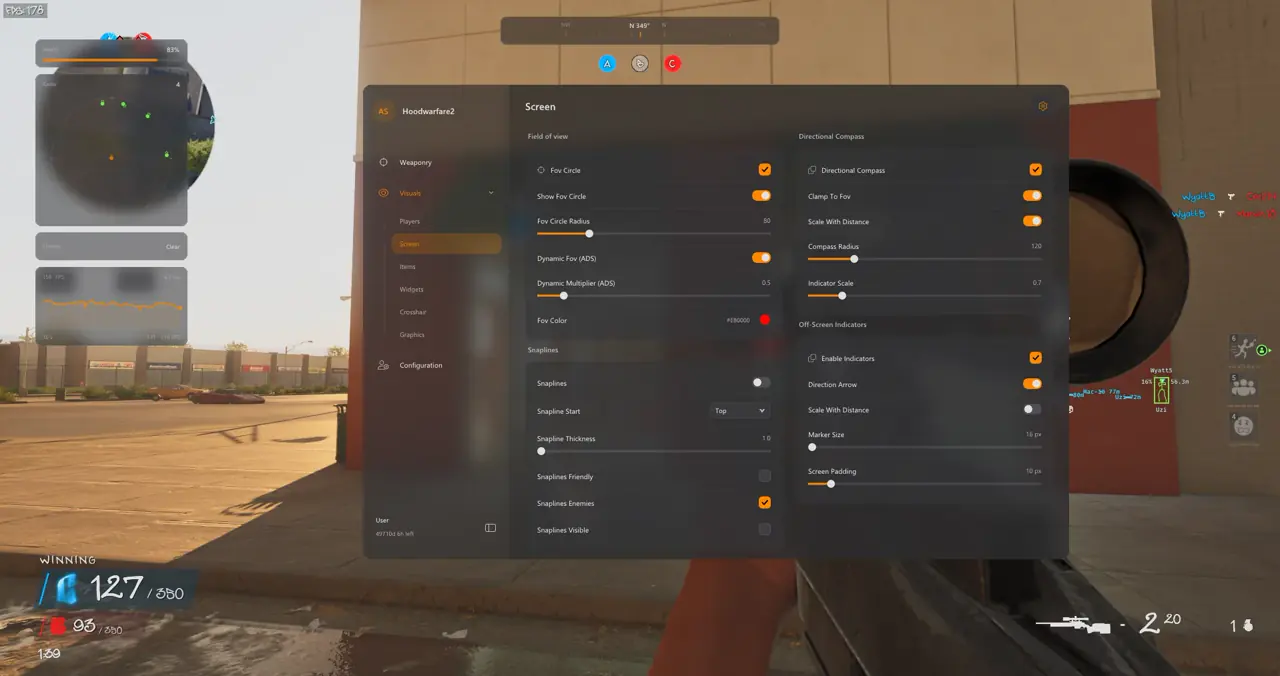
TXCIZ separates screen-space Targeting FOV from third-person Camera FOV Override inside two independent menu panels so peripheral view changes never distort aimbot acquisition bounds.
Dynamic ADS Multiplier scales your hip-fire Targeting FOV cone when aiming down sights, preventing distant rooftop targets from pulling your crosshairs during mid-street rifle sprays.
| Combat Engagement | Targeting FOV | Dynamic ADS Multiplier | Primary Bone & Priority |
|---|---|---|---|
| Alley Shotgun Duels (12-Gauge) | 90 – 120 px | 1.0 (No reduction) | Chest / Pelvis · Closest Distance |
| Street Skirmishes (Mac-10 / Uzi) | 60 – 85 px | 0.7 Multiplier | Neck / Upper Chest · Closest To Crosshair |
| Rooftop Overwatches (M40A5 Sniper) | 35 – 50 px | 0.4 – 0.5 Multiplier | Head · Bone Scan & Smallest FOV |
| Multi-Squad Turf Defense | 70 – 90 px | 0.6 Multiplier | Bone Scan · Lowest Health |
Targeting FOV and Dynamic ADS Scaling
Targeting FOV Circle under Visuals defines the active pixel radius (35px to 120px) around your crosshair, with custom HEX color (#EB0000) and optional Hide Mode. A 0.5 Dynamic ADS Multiplier shrinks an 80px hip-fire ring to 40px while scoped.
- Shotgun Close Quarters: Run
90px-120pxTargeting FOV with1.0Dynamic ADS for rapid alley turns. - Mid-Range SMG Skirmishes: Set
60px-85pxFOV with0.7Dynamic ADS on Mac-10 or Uzi builds. - Rooftop Sniper Overwatches: Clamp FOV to
35px-50pxwith0.4-0.5Dynamic ADS for M40A5 peeks.
Camera FOV Override Bounds
Camera FOV Override under Graphics Controls widens the rendered third-person lens (60° to 140°) without altering any screen-space aimbot pixel radius.
Target Priorities, 22-Bone Mapping, and Dynamic Bone Scan
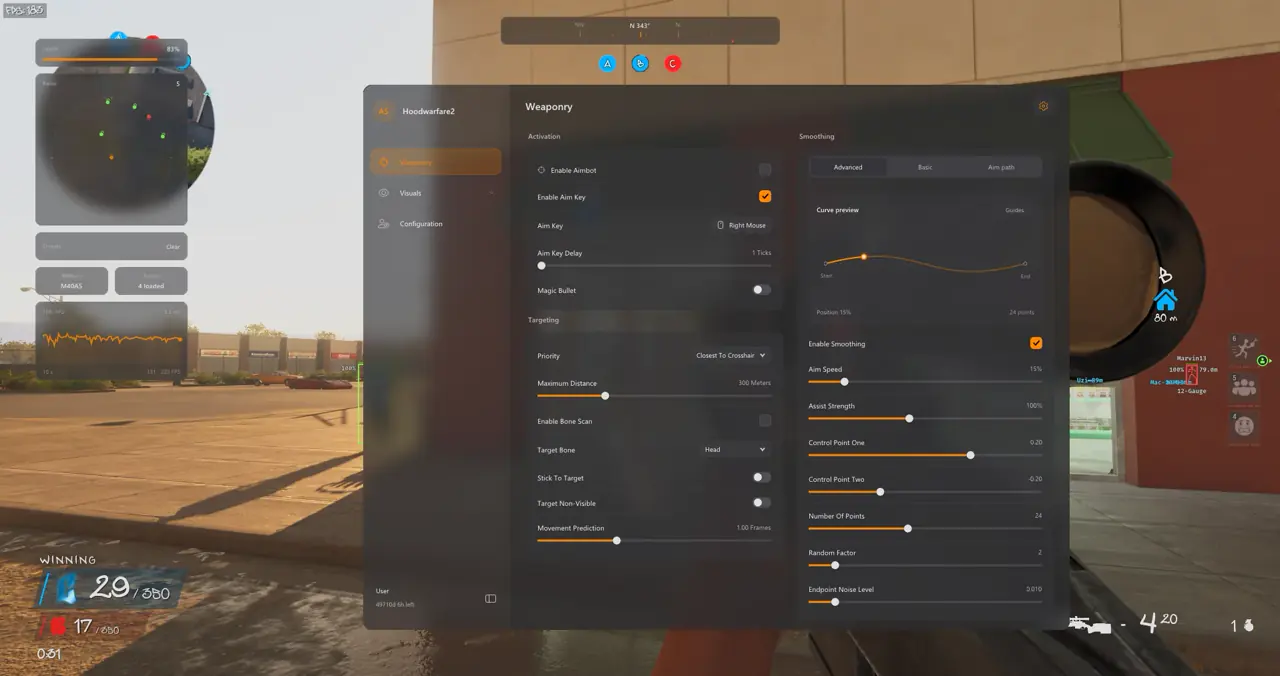
Weaponry targeting resolves priority order across five rules and sweeps all 22 skeletal bones automatically whenever solid cover hides a target head.
Five algorithms govern target picking: Closest To Crosshair, Closest To Bone, Closest Distance, Lowest Health, and Smallest FOV. Enabling Stick To Target retains your active lock if another enemy crosses the ring.
- Closest To Crosshair: Locks the enemy nearest your reticle during 1v1 alley peeks.
- Lowest Health: Focuses weakened attackers first during multi-squad turf fights.
- 22-Bone Scan: Shifts lock cleanly from concealed heads to exposed shoulders or elbows.
Basic Smoothing Presets vs. Advanced Bezier Curve Modulation
TXCIZ HW2 supplies Basic presets for rapid setup and an Advanced Bezier polynomial editor for granular crosshair acceleration and endpoint jitter.
Basic Smoothing offers Smooth, Balanced, and Aggressive curves paired with master Strength and Humanized toggles.
Advanced Bezier Sliders and Endpoint Noise
Advanced Smoothing tunes Control Point One (0.20), Control Point Two (-0.20), Number Of Points (24), Random Factor, and Endpoint Noise Level (0.010) inside the live Aim Path Visualizer so entry speed ramps smoothly and settles gently onto target bones.
Seven-Step Tuning Sequence and Weapon Archetype Pairing
Systematic calibration isolates one variable per test burst so you verify FOV clamping, 22-bone sweep stability, and Bezier deceleration cleanly.
- Save a clean baseline inside Configuration Profiles before modifying targeting sliders.
- Bind Right Mouse as Aim Key and set Aim Key Delay to
1or2ticks. - Enable the FOV Circle indicator at
70px-80pxradius on1080pdisplays. - Pick Closest To Crosshair priority, select
Neckas primary bone, and enable Bone Scan. - Activate Stick To Target and set Maximum Distance to
200m. - Adjust Control Point One (
0.20) and Control Point Two (-0.20) inside the Aim Path Visualizer. - Test Mac-10 and M40A5 bursts, set Endpoint Noise to
0.010, and save your profile.
Explore the full 9-module layout in our Hood Warfare 2 Feature & Street ESP Guide or compare arena settings in our Magic Bullet & Bone Scan Tuning Guide.
Review current uptime on Live Cheat Status, confirm Windows launch steps on Windows 10 & 11 Setup Guide, and inspect plans on Hood Warfare 2 PC Cheats.
Prerequisites, Expected Outcome & Fast Triage
Verify your Windows display and Step 2 security state before running Txcizware-Loader.exe (2.61 MB) with Hood Warfare 2 on Steam.
- Prerequisites: Windows 10/11 64-bit (
24H2-26H2), 8 GB+ RAM, Steam Windowed or Borderless (100%scale, HDR OFF), Step 2 toggles OFF,/statusbadge Undetected. - Expected Outcome: Library Launch prints [+] You can open the game now, pressing
F2at Main Menu triggers a beep and loads theInsertmenu, and OBS Game Capture stays StreamProof.
Fast Triage for Common Loader and Overlay Issues
Follow these four direct recovery steps if injection stalls, crashes, or hides your Bezier overlay.
- Loader closes or 0x00000001: Redo Step 2 Defender toggles after reboot, run Windows Time Sync now, and enable Cloudflare
WARP(1.1.1.1). - Stuck at 10% or 521 / 429: Enable Cloudflare
WARP(1.1.1.1) or wait15-30minutes for429limits to clear. - FOV circle offset or missing: Switch HW2 to Borderless or Windowed at
100%DPI scale and close RTSS, NVIDIA, or Discord overlays. - BSOD or MsSo64.sys error: Update system drivers, keep HVCI and Hyper-V off (pause BitLocker first), and send
Minidumpplusinjector.tosto #🎫┃ticket-maker.

