


How Does TXCIZ Adapt 83 Tools Across Delta Force Modes?
TXCIZ organizes all 83 Delta Force tools into 7 tabs on 64-bit Windows 10 and Windows 11 (16 GB+ RAM) under Anti-Cheat Expert (ACE), supporting Steam, Epic, and Level Infinite for Hazard Operations raids and 32v32 Havoc Warfare with OBS hiding.
Turning on every label at once fills crowded corridors with overlapping text walls. Instead, save mode-tuned presets inside Misc so combat and extraction visibility stay readable on every map.
- Hazard Operations: Enable Gold/Red container filters, Death Box ESP, and tight Aimbot FOV inside Zero Dam buildings.
- Havoc Warfare 32v32: Disable loot toggles, extend 2D Radar scale, and lower Dynamic ADS Multiplier for sniper scopes.
- Fast Config Swaps: Store both mode layouts inside Config Browser for two-click switching before entering live matches.
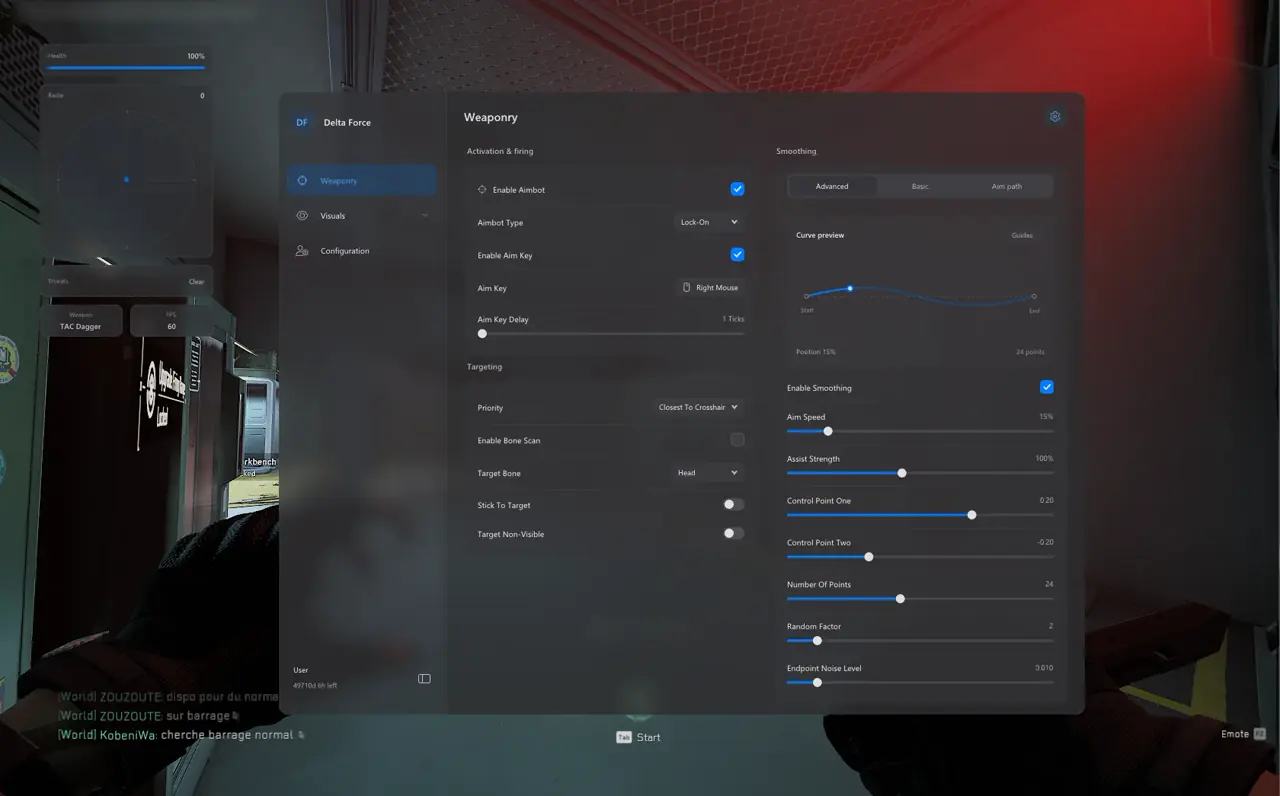
All Seven Feature Tabs in TXCIZ Delta Force
Every setting in the TXCIZ Delta Force client maps into one of seven focused tabs inside the Windows overlay menu.
Separating targeting, Player ESP, Screen Visuals, HUD Widgets, Crosshair, Misc Configs, and Operations Loot ESP prevents unused toggles from cluttering active play.
| Feature Tab | Setting Count | Core Capabilities | Primary Focus |
|---|---|---|---|
| 01. Aimbot | 11 Settings | Lock-On / Trigger-Bot, 5 Priorities, Bone Scan, Bezier curves, Visualizer | Smooth cursor tracking without snapping |
| 02. Player ESP | 14 Settings | 2D/Corner/Filled boxes, Skeletons, Health %, Weapons, Drag & Drop Preview | Instant threat and armor telemetry |
| 03. Screen Visuals | 12 Settings | Snaplines, FOV Circle, Dynamic ADS Multiplier, Compass, Distance Scaling | Automatic scope scaling and edge alerts |
| 04. HUD Widgets | 10 Settings | 2D Radar, Radar Scale, Blip Radius, Threat Warnings, FPS & Weapon Panels | 360-degree flank radar outside reticle |
| 05. Crosshair | 10 Settings | 10 Presets, Gap/Length/Thickness, Rotation, Live Preview | Clean center point during sprints |
| 06. Misc & Configs | 12 Settings | Sun Changer, Sun Color, Save/Load/Delete Configs, Hotkey, DPI Scaling | Lighting comfort and profile switching |
| 07. Operations Loot ESP | 14 Settings | Loose Items, Containers, Death Boxes, Real Names, White–Red Rarity Filters | High-value extraction pathing |
Specialized Guides by Delta Force Mode and Toolset
Dive into Bezier math, extraction loot tiers, and 32v32 radar presets across our dedicated Delta Force articles.
- Aimbot & Curves: Tune Lock-On vs Trigger-Bot in our Delta Force Aimbot & Bezier Tuning Guide.
- Extraction Raids: Filter Gold/Red containers in the Hazard Operations Loot & Extraction ESP Guide.
- 32v32 Warfare: Scale sniper scopes and OBS hiding in the Havoc Warfare Radar & OBS Guide.
Coordinating Aimbot, Controller Input, and StreamProof Radar
Treat Aimbot, Player ESP, and 2D Radar as three distinct range layers so close targets, mid-range peeks, and rear flanks stay clean.
TXCIZ supports native Xbox and DualSense controllers alongside Keyboard and Mouse out of the box, pairing trigger binds smoothly with Dynamic ADS Multiplier and Bezier smoothing.
- Dynamic ADS Multiplier: Shrinks your FOV Circle automatically when zooming down 4x–8x sniper optics.
- Team Filtering: Suppresses friendly boxes and snaplines across 64-player Havoc Warfare lobbies.
- Threat Warnings: Triggers an on-screen alert banner whenever an unseen enemy aims directly at your operator.
- StreamProof Capture: Keeps skeletons, loot labels, and menus hidden from OBS Game Capture and Discord shares.
- Custom Crosshair Overlay: Adjust gap, length, thickness, and rotation across 10 presets with live menu preview.
- Sun & DPI Controls: Clear harsh map glare with Sun Changer and scale menu fonts across 1080p, 1440p, and 4K displays.
5-Step Setup, Prerequisites & Fast Triage for Delta Force
Every Stripe checkout delivers your License Key immediately to /confirmation (View Your Key(s)) with zero site account required.
Follow the five steps below after checking live Undetected status so Steam, Epic Games Store, and Level Infinite builds inject cleanly.
- Check
/statusshowsUndetected, then purchase 1 Day, 1 Week, or 1 Month access on the Delta Force product page. - Copy your License Key from
/confirmationand downloadTxcizware-Loader.exe(2.61 MB) into a Desktop folder. - Complete Step 2 Windows security switches, Run as Administrator, and redeem your key in one loader account.
- Click Launch, open Delta Force in Borderless Windowed mode, and press
F2at Main Menu until it beeps. - Press
Insertto open the 7-tab menu, load your Hazard Operations or Havoc Warfare preset, and verify OBS hiding.
Prerequisites, Expected Outcome & Fast Triage
Confirm system RAM, display alignment, and loader readiness before entering live ACE-protected lobbies.
- Prerequisites: 64-bit Windows 10/11 (24H2–26H2), 16 GB+ RAM, Windowed/Borderless 100% scale, HDR OFF, Step 2 OFF,
/statusUndetected. - Expected Outcome: Loader prints
[+], Main MenuF2beeps, andInserttoggles all 7 tabs cleanly. - Fast Triage: On
0x00000001redo Step 2; on521or429enableWARP; on offset boxes use Borderless at 100% scale.
Inspect live Delta Force tiers on Delta Force PC Cheats, check Live Cheat Status, and review Windows 10 & 11 Setup Guide.
For Windows security diagnostics and error codes, read Txcizware-Loader.exe Security & Error Diagnostics.

