
The Six Modular Systems in the TXCIZ Dead by Daylight Suite
TXCIZ Dead by Daylight organizes 58 settings across 6 independent modules on Windows 10/11 64-bit (8 GB+ RAM) for Steam, Epic Games Store, and Microsoft Store (Xbox PC), letting Survivors and Killers mix clean visual ESP with optional skillcheck or hatchet tuning.
Each module toggles independently without restarting the trial, so you run clean Fullbright and objective ESP alone or add Auto Skill Checks and ranged Killer prediction on demand.
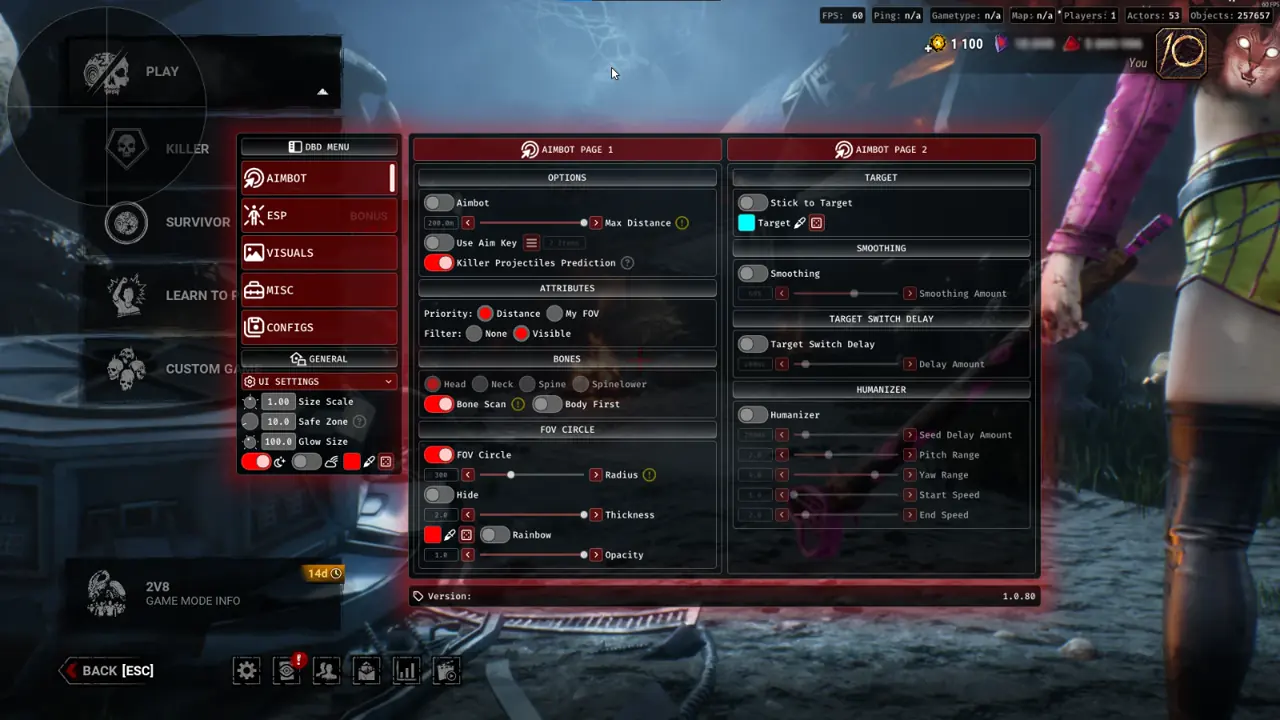
| Menu Group | Settings Count | Included Capabilities & Role Advantage |
|---|---|---|
| 01. Aimbot & Prediction | 12 Settings | Bone Scan, Stick to Target, Smoothing, Humanizer, Huntress hatchet prediction |
| 02. Misc Exploits & QoL | 15 Settings | FOV, Auto Skill Checks, Auto Moonwalk, Killer/Free Cam, Trap Immunity, Footsteps |
| 03. ESP & Chams | 7 Settings | Players, Killer NPCs, World Objectives, Survivor Items, Traps, Typography |
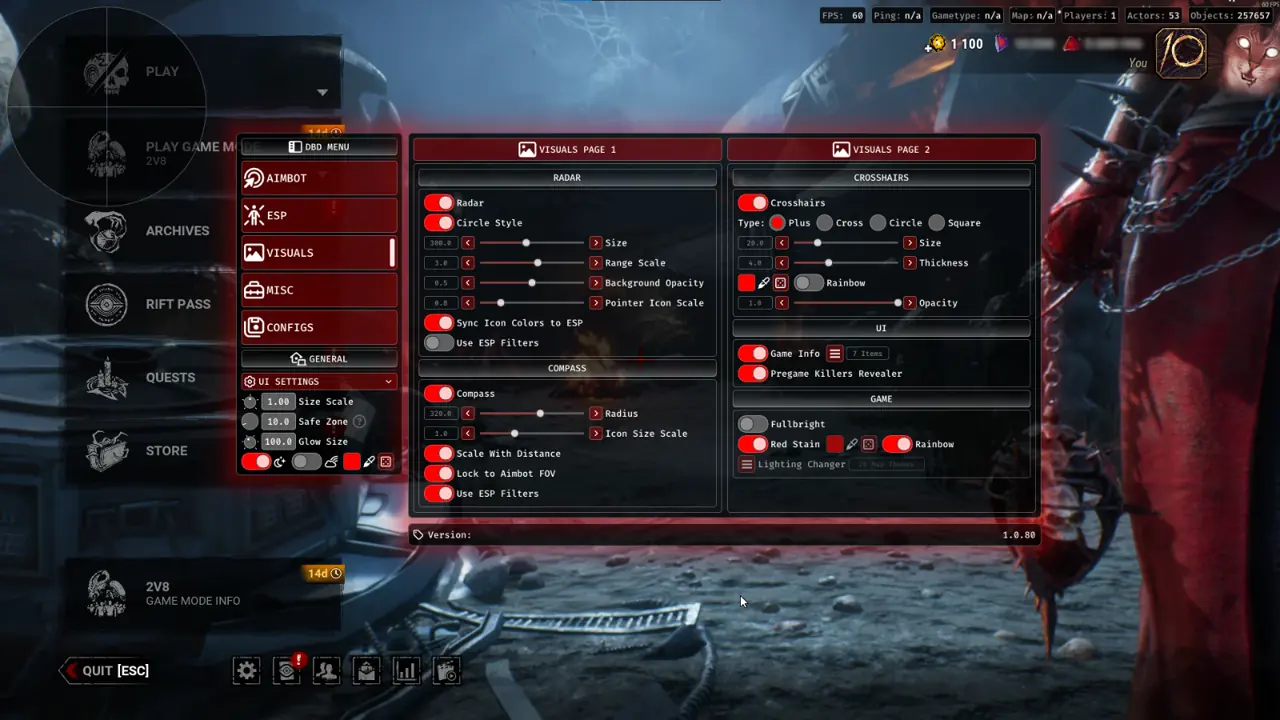
| 04. Visuals & Overlays | 6 Settings | 2D Radar, Directional Compass, Crosshairs, Game Info, Fullbright, Red Stain |
| 05. Configs & Profiles | 12 Settings | Import/Export desktop configs, Default lock, 10 KeyBindConfig slots |
| 06. UI Settings | 6 Settings | Size Scale, Safe Zone, Glow Size, Dark Mode, Rainbow Mode, Accent Color |
Role Profiles: Survivor Looping vs. Killer Patrol Presets
Survivor and Killer queues require opposite telemetry, which TXCIZ supports through 10 instant KeyBindConfig slots (F5 for Survivor, F6 for Killer).
Keep both profiles saved in lightweight local JSON via Module 05 Configs and back them up using Export to desktop.
Survivor Profile: Red Stain, Trap Immunity & Footsteps
Survivors combine Auto Skill Checks with Red Stain extension through walls to neutralize backwards-walking mindgames at Killer Shack tiles.
- Trap Immunity: Prevents accidental snaps when vaulting into concealed traps or snares.
- Killer Cam Hotkey: Checks active Killer patrol direction on demand.
- See Survivors Footsteps: Tracks teammate rotation lines for coordinated resets and saves.
- Legit Speed Hack: Applies subtle
1%-5%velocity tuning toward safety pallets.
Killer Profile: Health States, Hatchet Lead & Custom Red Stain
Killers track Healthy, Injured, Deep Wound, Slugged, and Hooked Survivor tags alongside dedicated Huntress projectile lead prediction (No Hit Cooldown and Infinite Lunge stay optional for private testing).
Fullbright Lighting, Custom Red Stain, and 2D Radar Configuration
Module 04 Visuals eliminates dark shadows on Midwich Elementary, Gideon Meat Plant, and Backwater Swamp while adding a 64m 2D Radar perimeter.
Enabling Fullbright strips crushed black haze across indoor corridors without blinding aura icons, while the corner 2D Radar tracks flanking rotations around tall jungle gyms.
Instant Stripe Checkout, Key Vault, and 6-Step Loader Workflow
TXCIZ offers 1-Day (€4.99), 1-Week (€14.99), and 1-Month (€39.99) keys delivered instantly to /confirmation with your Saved Order Link, 6-digit Order ID, 48-character Backup Code, and .txt receipt. Follow these 6 steps:
- Verify live build status on Live Cheat Status and choose a plan on the Dead by Daylight product page.
- Copy your key from
/confirmation(View Your Key(s)) or your downloaded.txtreceipt. - Join TXCIZ Discord Community, watch the walkthrough video, and download
Txcizware-Loader.exe(2.61MB) from #📖┃guide into a Desktop folder. - Finish Step 2 Windows security switches first, then right-click
Txcizware-Loader.exeas Administrator and redeem your key inside 1 loader account. - Click Library Launch, open Dead by Daylight in
BorderlessorWindowedmode (100%DPI scale), and pressF2at the Main Menu until it beeps. - Press
Insertin-game to open the menu, choose your theme, and load your Survivor or Killer profile.
Check Live Cheat Status, review Windows 10 & 11 Setup Guide, and select plans on Dead by Daylight PC Cheats.
Deepen loop reads in our Dead by Daylight 40-Actor & Trap ESP Guide, manage objectives in our Generator, Hex Totem & Hatch ESP Guide, or tune timing in our Auto Skillcheck & Huntress Prediction Guide.
Prerequisites, Expected Outcome & Fast Triage
Confirm Windows configuration and Step 2 toggles before launching Dead by Daylight across Steam, Epic, or Xbox PC.
- Prerequisites: Windows 10/11 64-bit (
24H2-26H2), 8 GB+ RAM, Windowed or Borderless (100%scale, HDR OFF), Step 2 toggles OFF,/statusbadge Undetected. - Expected Outcome: Library Launch displays [+] You can open the game now;
F2at Main Menu triggers a beep and loads theInsertmenu; OBS Game Capture stays StreamProof.
Fast Triage for Common Loader and Overlay Issues
Apply these four recovery actions if the loader exits early, hangs at 10%, or misaligns the HUD.
- Closes or 0x00000001: Redo Step 2 Defender settings after reboot, sync Windows Time, and enable
WARP(1.1.1.1). - Stuck 10% or 521 / 429: Enable Cloudflare
WARP(1.1.1.1) or wait15-30minutes if hitting429rate limits. - Menu missing or offset: Confirm
BorderlessorWindowedmode,100%scale, and close NVIDIA, Discord, or RTSS overlays. - BSOD or MsSo64.sys: Update drivers, keep HVCI and Hyper-V off (pause BitLocker first), and send
Minidumpplusinjector.tosto #🎫┃ticket-maker.

