
Auto Skillcheck Timing & Ranged Projectile Physics in DBD
TXCIZ Dead by Daylight automates Survivor skillchecks (15ms–45ms variance across Hyperfocus, Overcharge, Merciless Storm, and Decisive Strike) while adding 65% velocity-compensated Huntress hatchet, Deathslinger, and Trickster projectile prediction inside a StreamProof 4.5° Humanizer window across Windows 10 and Windows 11 64-bit trials.
Both roles punish hesitation under pressure: missed Survivor checks regress repairs and reveal positions, while uncompensated hatchet throws miss strafing targets across shack windows. The TXCIZ Dead by Daylight Suite handles each cleanly.
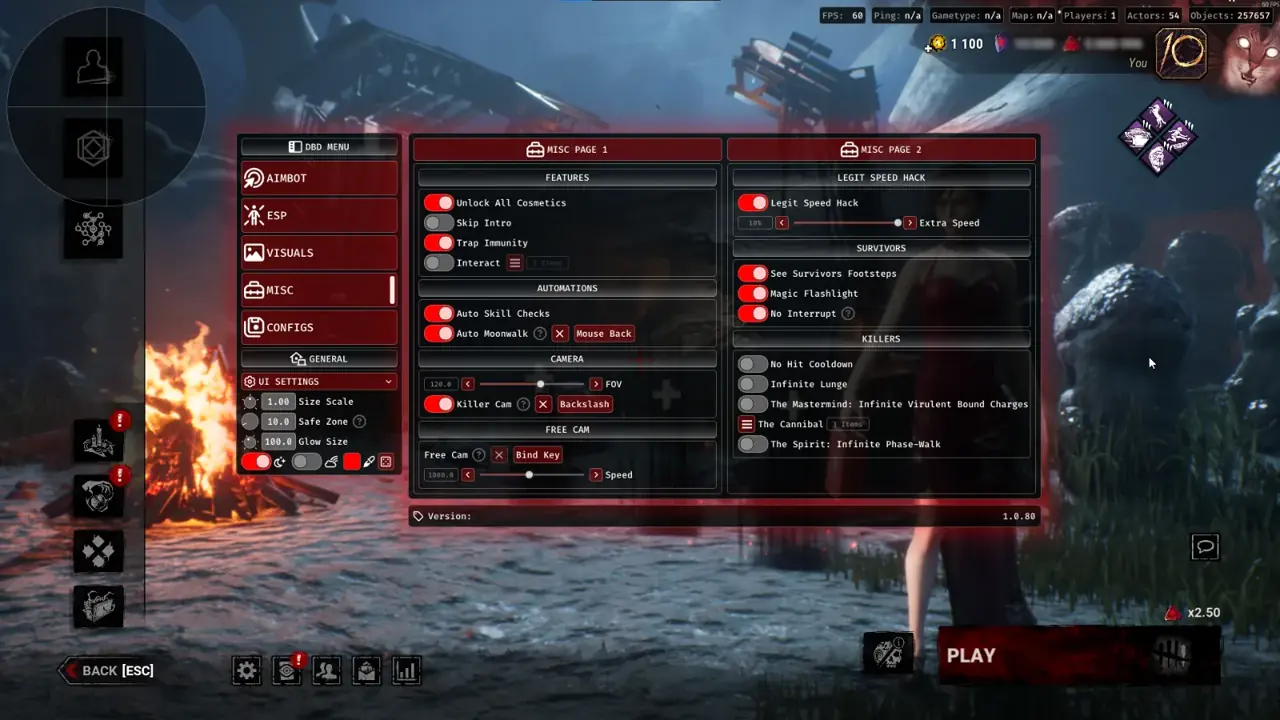
Survivor Skillcheck vs. Ranged Killer Preset Matrix
Storing two isolated role presets inside Module 05 Configs lets you swap smoothly between Survivor with Friends lobbies and solo Killer matches.
| Feature Module | Survivor Legit Preset | Ranged Killer Preset |
|---|---|---|
| Auto Skillcheck (Module 02) | Enabled · 15ms–45ms Good/Great Variance | Disabled (Killer Role) |
| Aimbot & Prediction (Module 01) | Disabled or Flashlight Aim Only | Enabled · 4.5° FOV · 65% Velocity Lead |
| Smoothing Curve | N/A | Humanizer (+ Settings) Smooth Wind-Up |
| Player ESP (Module 03) | Killer Name + Distance + Hook Stages | 4 Survivors · Health State + Skeletons |
| Display & Camera FOV | Borderless · Subtle Camera FOV Comfort | Borderless · Wide Chase Awareness |
Calibrating 65% Lead Across Huntress, Deathslinger & Trickster
Setting lateral Velocity Lead around 65% handles Survivor weave between pallets without over-leading abrupt 90-degree loop cuts, pairing cleanly with chest-to-shoulder Bone Selection over tall vaults.
Five-Step Calibration for Natural Skillchecks and Hatchet Throws
Follow these five tuning rules so Great Skillchecks and ranged throws maintain authentic human rhythm across high-MMR trials.
- Configure Auto Skill Checks inside a randomized
15ms–45mstiming window, mixing Good and Great hits unless runningHyperfocusplus Stake Out. - Enable
Fullbrightaround25%shadow lift on dark Coldwind cornfields and Lery corridors so Survivor silhouettes stay legible without washing out perk auras. - Bind Killer Lock-On to Right Mouse or a side thumb key so free camera movement resumes until hatchet wind-up begins.
- Keep Target Non-Visible disabled so crouched Survivors behind high-wall tiles never trigger camera snaps.
- Save separate
Survivor_SkillcheckandKiller_Huntressprofiles inside Module 05 Configs at100%Borderless DPI scale.
Complete Your Dead by Daylight Setup
Combine mechanical tuning with full-map macro tracking in our Generator, Hex Totem & Hatch ESP Guide, chase-loop geometry in our 40-Actor & Trap ESP Guide, and full 6-module reference in our Dead by Daylight Setup Guide.
Check live patch parity on Live Cheat Status, verify Windows security prep on Windows 10 & 11 Setup Guide, and unlock instant keys on Dead by Daylight PC Cheats.
Prerequisites, Expected Outcome & Fast Triage
Verify your Windows display scale and Step 2 settings before running Txcizware-Loader.exe (2.61 MB) for Dead by Daylight.
- Prerequisites: Windows 10/11 64-bit (
24H2-26H2), 8 GB+ RAM, Windowed or Borderless (100%scale, HDR OFF), Step 2 toggles OFF,/statusbadge Undetected. - Expected Outcome: Library Launch displays [+] You can open the game now;
F2at Main Menu beeps and loads theInsertmenu; Auto Skillcheck triggers inside15ms–45msand OBS stays StreamProof.
Fast Triage for Common Loader and Skillcheck Issues
Apply these four fixes if the loader closes, auth hangs, or skillcheck pixel detection misses.
- Loader closes or 0x00000001: Redo Step 2 Defender settings after reboot, sync Windows Time, and activate
WARP(1.1.1.1). - Stuck 10% or 521 / 429: Turn on Cloudflare
WARP(1.1.1.1) or wait15-30minutes for429limits to clear. - Skillcheck needle misses or HUD shifted: Confirm Borderless/Windowed mode,
100%Windows DPI scale, HDR OFF, and close NVIDIA, Discord, or RTSS overlays. - BSOD or MsSo64.sys: Update drivers, keep HVCI and Hyper-V off (pause BitLocker first), and send
Minidumpplusinjector.tosin #🎫┃ticket-maker.

