
9-Module TXCIZ Architecture for Hood Warfare 2
TXCIZ splits 74 Hood Warfare 2 tools into 9 clean tabs on Win 10 and Win 11 64-bit PCs (8 GB+ RAM), so Steam users tune Bone Scan aim, street item ESP, 2D radar, and camos with StreamProof OBS safety and zero FPS clutter.
Unreal Engine 5 modes like Turf War, GangBang, Hit A Lick, Destroy The Block, and Chain Snatch pack fire escapes and parked cars tightly. Modular toggles let you disable unneeded visuals mid-match.
- Clean Subsystems: Keep combat aim, player boxes, street pickups, and radar independent.
- Zero Menu Bloat: Toggle single categories off mid-match instead of scrolling one huge list.
Weaponry & Aimbot: Priority Modes, Bone Scan, and Magic Bullet
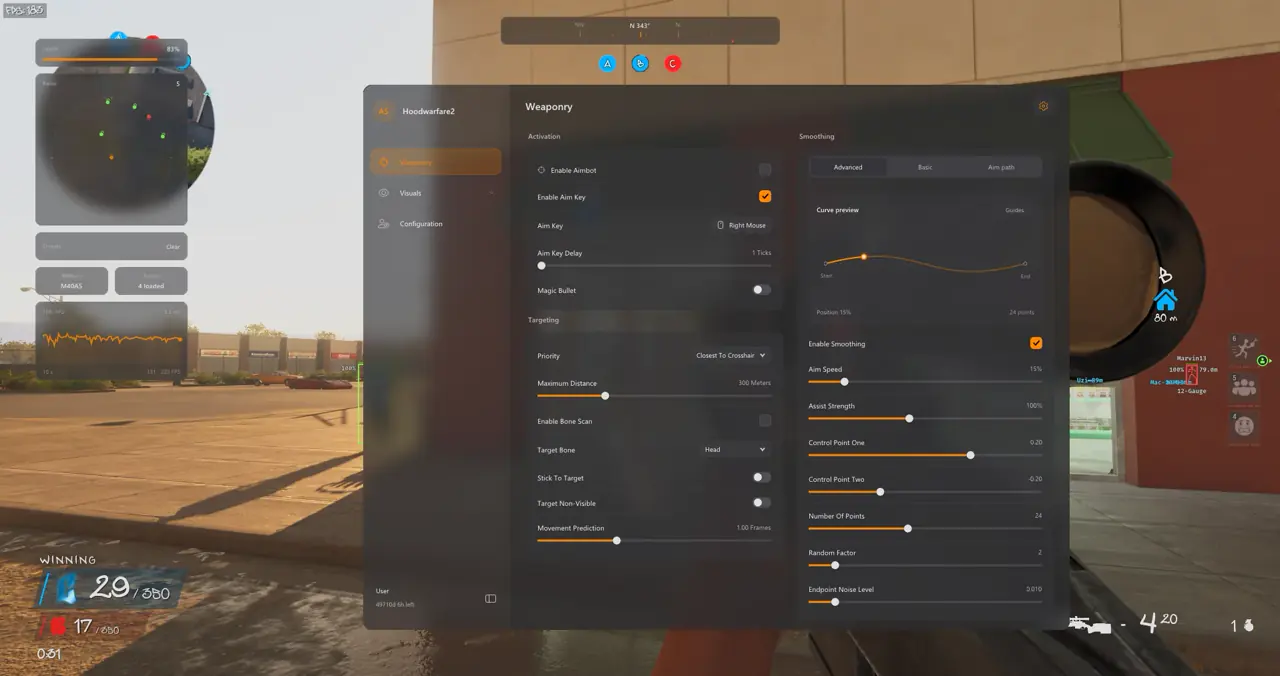
Weaponry splits targeting rules (5 priorities, 22-bone Bone Scan) from Bezier acceleration and optional Magic Bullet routing.
Bind an Aim Key (Right Mouse or thumb button) with a short Aim Key Delay in ticks. Add Stick To Target and Movement Prediction (1.00 Frames) to track sliding rivals cleanly.
| Menu Group | Settings Count | Core Capabilities |
|---|---|---|
| 01. Aimbot & Targeting | 9 Settings | Aim Key delay, Magic Bullet, 5 priorities, Bone Scan, Stick To Target, Prediction |
| 02. Smoothing & Aim FOV | 7 Settings | Basic Smooth/Balanced/Aggressive, Advanced Bezier points, Dynamic ADS multiplier |
| 03. Player ESP | 10 Settings | 2D/Corner/Filled boxes, Skeleton, Held Weapon, Health Bar, Ignore Non-Visible |
| 04. Item & Objective ESP | 9 Settings | Weapon pickups, Ammo/Medkits, Capture The Block bombs, Drive-by cars, Blast markers |
| 05. Radar & Awareness | 8 Settings | 2D Radar scale, Compass Bar, Off-screen arrows, Snaplines, Threat Warning |
| 06–09. HUD, Graphics, Configs, Misc | 31 Settings | Crosshairs, FPS graph, Camera FOV, Profiles, Bunny Hop, Tracers, Camo, Speed Editor |
All Nine Feature Groups at a Glance
Groups 01-02 handle targeting and smoothing, 03-06 render ESP, radar, and HUD crosshairs, 07-08 govern Unreal clarity and saved profiles, and 09 hosts Bunny Hop, Camo Cycler, and Sun Color.
Player ESP Overlays and Street Item Filters
Player ESP draws 2D Outline, Corner, or Filled boxes plus real-time bone skeletons with drag-and-drop label positioning.
Display Player Name, Held Weapon (M40A5, Uzi, Mac-10, 12-Gauge), Distance, and Health Bars. Enable Ignore Non-Visible and cap render distance (100m-300m).
- Weapon Pickups: Spot loose Mac-10s, Uzis, pump shotguns, and rifles with distance tags.
- Ammo Boxes & Medkits: Locate spare ammo crates and health packs fast between blocks.
- Objectives & Bombs: Track Turf War zones, capture blocks, and active bomb sites.
- Bullets & Drive-By Cars: Watch incoming tracer arcs, hostile cars, and suicide blasts early.
2D Radar, Compass Bar, and HUD Telemetry Widgets
Move situational clutter off center screen using the circular 2D Radar (230px+ resize range) synced to your Player ESP colors.
Pin the top Compass Bar (0°-360°, 120° view) for A/B/C zones, enable Off-Screen Arrows, and load custom crosshairs plus the FPS Graph.
- 2D Radar Scale: Tighten scale for narrow hallways and expand it across street blocks.
- Custom Crosshairs: Adjust gap, length, thickness, and rotation sliders with live preview.
Unreal Engine 5 Visual Clarity, Camo Cycler & Profiles
Graphics Controls disable Film Grain, Motion Blur, Chromatic Aberration, and Depth of Field to sharpen dark alleys immediately.
Widen sightlines with Camera FOV Override, lift shadows using Sun Color and Fullbright, and cycle skins via the Camo Cycler (0.1s-15.0s).
Quick Checkout, Confirmation Key Vault & Setup Steps
Pick 1 Day (€3.99), 1 Week (€14.99), or 1 Month (€24.99) via Stripe (Card, Apple Pay, Google Pay, Klarna, iDEAL, Bancontact) with instant /confirmation delivery.
- Join TXCIZ Discord Community, watch the #📖┃guide video, and download
Txcizware-Loader.exe(2.61MB) to a Desktop folder. - Finish Step 2 security switches (Defender toggles, Firewall, Smart App Control, Core Isolation) and set
100%display scale. - Right-click the loader as Administrator, sign into 1 loader account, redeem your key under Account, and click Library Launch.
- Start Hood Warfare 2 in Windowed or Borderless mode, press
F2at the Main Menu until it beeps, and toggle the menu withInsert.
Compare plans on Hood Warfare 2 PC Cheats after verifying live uptime on Live Cheat Status, and review Windows 10 & 11 Setup Guide.
Dive deeper in our Hood Warfare 2 Aimbot, FOV & Bezier Guide, Magic Bullet & Arena Preset Guide, and Capture The Block Pickup ESP Guide.
Prerequisites, Expected Outcome & Fast Triage
Confirm these requirements and recovery actions before launching Hood Warfare 2 on Windows 10 or Windows 11.
- Prerequisites: Windows 10/11 64-bit (
24H2-26H2), 8 GB+ RAM, Steam Windowed/Borderless (100%scale, HDR OFF), Step 2 toggles OFF,/statusUndetected. - Expected Outcome: Library Launch displays [+] You can open the game now;
F2at Main Menu beeps and loads theInsertoverlay; OBS Game Capture stays StreamProof.
Fast Triage for Common Loader Errors
Apply these exact fixes if the loader closes, stalls at 10%, or drops your overlay.
- Closes or 0x00000001: Redo Step 2 Defender toggles after reboot, click Windows Time Sync now, and turn on
WARP(1.1.1.1). - Stuck 10% or 521 / 429: Enable Cloudflare
WARP(1.1.1.1) or wait15-30minutes on429. - Overlay hidden or offset: Confirm Borderless/Windowed,
100%scale, and close NVIDIA, Discord, or RTSS overlays. - BSOD or MsSo64.sys: Update drivers, keep HVCI and Hyper-V off (pause BitLocker first), and send
Minidumpplusinjector.tosin #🎫┃ticket-maker.

