
Winning the Prep-Phase Drone and Utility Economy
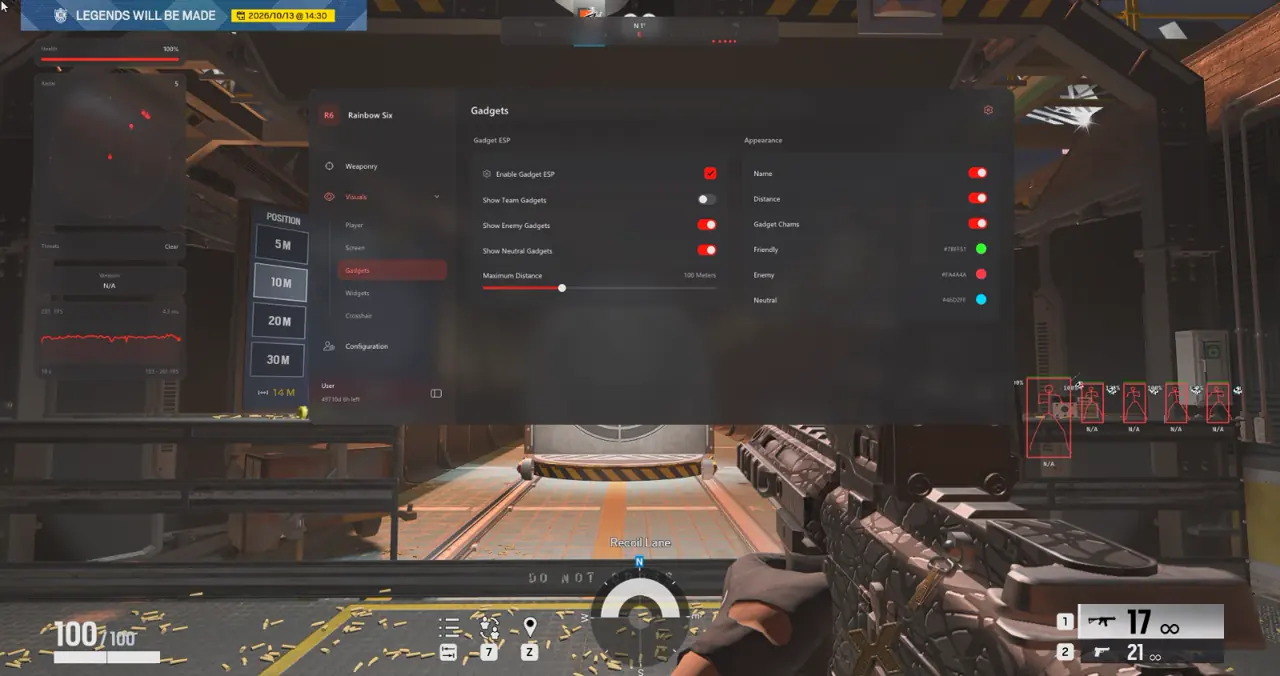
In Rainbow Six Siege 04. Gadget ESP, 6 dedicated controls separate Friendly, Enemy, and Neutral deployables across Ubisoft Connect, Steam, and Epic Games Store so attackers spot Kapkan EDDs, Fenrir F-NATT mines, and hidden Valkyrie Black Eyes without sacrificing prep-phase drones to Solis or Mozzie.
Most solo and stack executes fail when early drones get destroyed inside site, forcing entry fraggers to face-check concealed doorframe traps, Lesion Gu mines, and beneath-floor Nitro Cells blind during the final forty seconds.
Why Saving Two Prep-Phase Drones Changes Post-Plant Control
Driving directly onto the bomb site during preparation guarantees drone destruction from Mute jammers or vigilant anchors. Instead, keeping both attacker drones hidden along flank stairwells gives surviving teammates real-time camera callouts during retakes while 04. Gadget ESP already accounts for site traps.
- Enable Gadget ESP + Gadget Name Labels: Identify trap archetypes cleanly without rolling a drone through doorways.
- Disable Friendly Gadgets: Keep your own breach charges, claymores, and nomad airjabs hidden from trap filters.
- Set Gadget Chams Colors: Assign bright amber to hostile electronics and cyan to neutral or defender drone targets.
Recommended Gadget Chams Filters for Attack vs. Defense
Match gadget distance limits and team filters inside the TXCIZ Rainbow Six Siege Suite to your round role.
| Visual Layer | Attacker Trap-Clear Setup | Defender Anti-Drone Setup |
|---|---|---|
| Gadget Team Filters | Enemy Gadgets ON · Friendly and Neutral OFF | Enemy and Neutral Gadgets ON · Friendly Traps OFF |
| Gadget Maximum Range | 25 m Entry Corridor Cap | 30 m Prep-Phase Drone Intercept Cap |
| Gadget Chams and Labels | High-Glow Chams + Name Labels ON | Bright Chams on Drones and Claymores |
| Supporting Player ESP | 1 px Thin Skeleton + Weapon Label (45 m) | Outline Box + Operator Name (50 m) |
High-Priority Traps and Electronic Targets
Luminescent Gadget Chams cut through dim shadows, foliage, and broken debris around entry windows and vertical hatch drops so Buck, Sledge, and Ram attackers clear site floors efficiently.
- Entry Traps: Spot Kapkan EDD lasers, Frost Welcome Mats, Lesion Gu mines, and Thorn Razorbloom shells before vaulting.
- Vertical C4 and Denials: Identify pre-placed Nitro Cells taped beneath soft kitchen floors and Bandit or Kaid wall-denial gadgets.
- Intel Cameras: Locate hidden Valkyrie Black Eyes and Maestro Evil Eyes tucked above rafters without wasting IQ scans.
Four Replay-Safe Rules for Using Utility and Drone Intel
Match Replay records every first-person frame in Siege, making natural line-of-sight utility clearing essential for clean Ranked and Standard matches.
- Park your prep-phase drone safely along flank stairwells instead of driving straight into Mute jammers or Mozzie pests.
- Wait until your operator enters natural doorway sightlines before shooting Kapkan traps, Fenrir canisters, or ceiling cameras.
- On Defense anchors like Mute, Mira, or Azami, enable Enemy Gadget filters to intercept incoming Twitch, Brava, and Flores drones early.
- Check Live Cheat Status prior to queueing so your build matches the active Ubisoft Connect or Steam patch.
Continue refining your loadout with our Rainbow Six Siege Operator ESP and Radar Guide, Rainbow Six Siege Aimbot, Occlusion and Curves Guide, and Rainbow Six Siege Legit Micro-FOV and StreamProof Guide, or review durations on the Rainbow Six Siege Product Page.
Prerequisites, Expected Outcome and Fast Triage
Confirm your Windows 10/11 64-bit display configuration via our Windows Setup Guide before running Txcizware-Loader.exe.
Verification and Quick Troubleshooting
Maintaining native DPI scaling prevents misaligned gadget chams across 1080p and 1440p monitors.
- Prerequisites: 64-bit Windows 10/11 (
24H2–26H2), 8 GB+ RAM, Windowed/Borderless at100%display scale, Step 2 Windows Security switches OFF. - Expected Outcome: Pressing
F2at Main Menu injects cleanly;Insertopens 04. Gadget ESP, and OBS Game Capture hides all chams and labels. - Fast Triage: If gadget labels drift slightly off world geometry, switch display mode to Borderless and reset Windows Scale to
100%; if521or10%stall occurs, enable CloudflareWARP.

